iOS 1.3.1 live on the App StoreMay 10, 2026

Deckloud,Nextcloud Deck on iPhone and Mac.

An independent client for serious Nextcloud Deck users. Connect straight to your own server, keep core board work moving when the network drops, and add Focus, widgets, and a one-time Pro unlock when your workflow gets heavier.

Your own serverOffline resilienceIndependent client
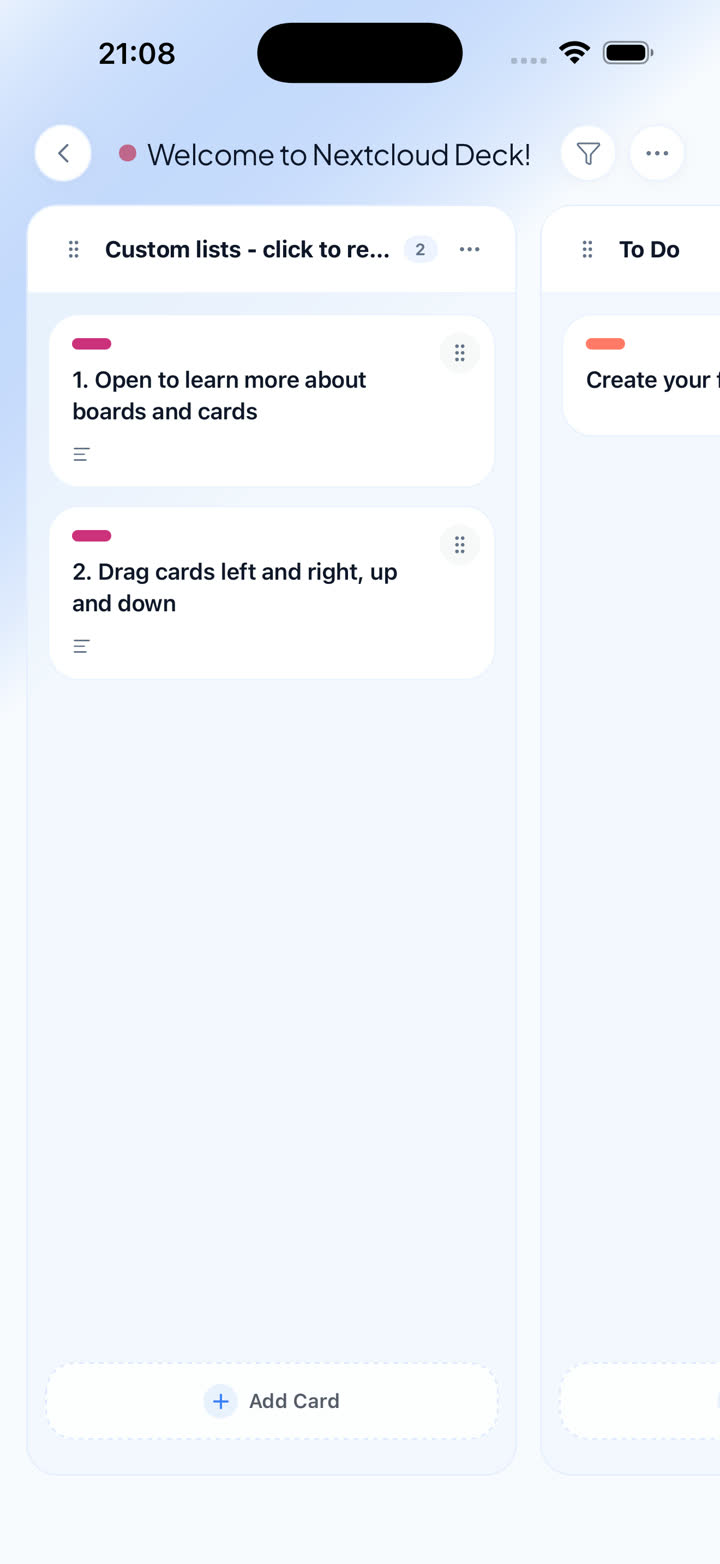
Deckloud iOS board view

Works with your existing Nextcloud setup

Use any compatible Nextcloud server or provider. Deckloud signs in with Nextcloud Login Flow v2 and opens the boards you already run.

Self-hosted servers and managed providers
Existing boards, labels, assignees, comments, and attachments
No migration or relay backend in the middle

Download

Get Deckloud

Start on iPhone. Add the macOS companion when your Nextcloud Deck workflow gets wider, heavier, or more Apple-centric.

Deckloud for iPhone

Your existing Nextcloud Deck boards with direct server sync, queue-aware offline resilience, and fast native navigation built for iPhone.

iOS 15.1 or later
iOS 1.3.1 live on the App StoreUpdated May 10, 2026

Deckloud for macOS

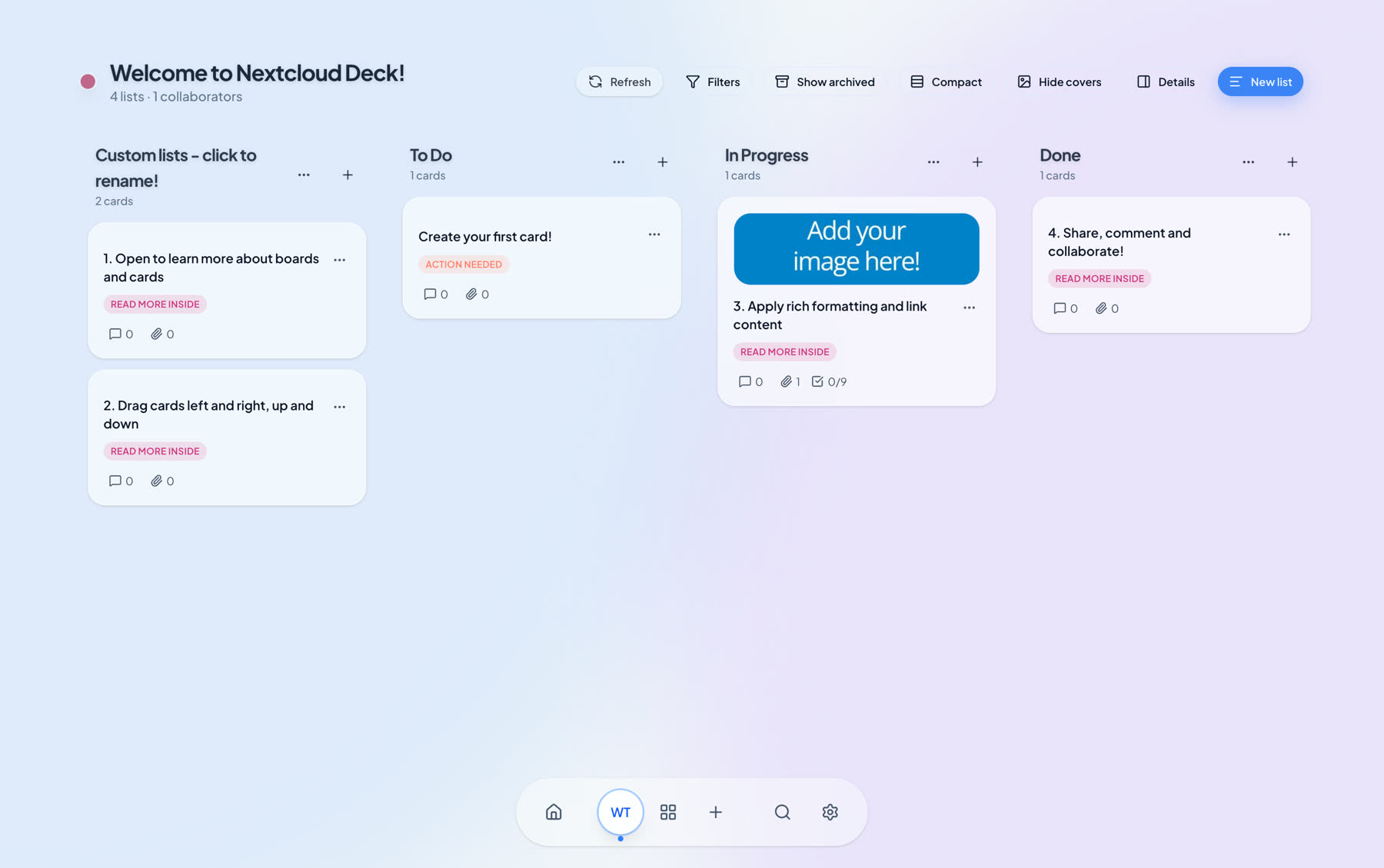
The companion Mac app for keyboard speed, drag-and-drop board work, and a larger view of the same Nextcloud Deck setup.

macOS 13 or later · Apple Silicon or Intel Mac
Desktop 0.5.2May 10, 2026
brew install --cask hweihwang/nextcloud-deck/deck-desktop

Homebrew install is for Apple Silicon. Intel Macs should use the Intel download above.

Features

Built for existing Nextcloud Deck workflows

Everything you need to stay productive on iPhone while keeping your boards on your own Nextcloud.

Boards, stacks, and cards

Manage the same board model you already use in Nextcloud Deck.

Due dates and reminders

Track deadlines and keep today’s work visible on iPhone.

Labels, filters, and search

Find the right card fast across boards, labels, assignees, and text.

Direct Nextcloud sync

Connect to your own server without a relay backend in the middle.

Comments, Markdown, attachments

Keep the context on each card instead of flattening work into a basic todo list.

Offline resilience

Core actions queue while you are offline, with recovery tools kept in the free trust layer.

Pricing

Free core app. One-time Pro unlock.

Start free, then add timed Focus sessions, rich widgets, and Quick Capture when your Nextcloud Deck workflow needs more speed.

Free

Free

Everything you need for day-to-day Nextcloud Deck use on iPhone.

  • Boards, stacks, cards, comments, attachments, and search
  • Direct sync to your own Nextcloud server
  • Core offline queue for essential board work
  • macOS companion app available separately

Deckloud Pro

One-time purchase

Unlock timed Focus sessions, rich widgets, Quick Capture, and future Pro workflow upgrades without a subscription.

  • Timed Focus sessions for working through due cards
  • Rich iOS widgets with card details and deep links
  • Quick Capture with saved board and section
  • Future capture, widget, and Focus upgrades included

Shared core across iPhone and macOS

  • Same Nextcloud account and board model on iPhone and Mac
  • Direct OCS API integration with no relay backend
  • Board and card content stays on your own server

Platforms

One Apple workflow, two native apps

Use iPhone when you are away from the desk, and macOS when you need more room to work.

iPhone

  • Touch-first gestures and haptics
  • Optimized for iPhone layouts
  • Secure credentials in iOS Keychain
  • Offline queue with automatic replay
  • Native scrolling and transitions

macOS companion

  • Keyboard shortcuts and fast search
  • Drag-and-drop board management
  • Desktop-sized board overview
  • Menu bar access and auto-updates
  • Homebrew install option

Releases

Release notes

What shipped, when it shipped, and how the iPhone and desktop apps are evolving.

iPhone

iPhone releases

The main Deckloud product track on the App Store.

Current release

v1.3.1May 10, 2026
Open on App Store

Latest highlight

Deckloud 1.3.1 adds system Share capture so links and text can move into your Nextcloud Deck boards with less context switching.

Full notes and history

  • Deckloud 1.3.1 adds system Share capture so links and text can move into your Nextcloud Deck boards with less context switching.
  • Board, search, Focus, trash, and settings flows are faster to scan and smoother to navigate on iPhone.
  • Local-first sync, widgets, Pro restore, diagnostics, and release startup are more reliable.

Previous releases

v1.3.0May 6, 2026

Deckloud 1.3.0 is a larger iPhone refresh: Home, Search, Focus, and Settings now make boards, due work, sync health, diagnostics, and account tools easier to reach.

v1.2.2Mar 31, 2026

Refined Home, Search, Focus, and Settings so boards, due work, sync state, and account tools are faster to reach.

v1.2.1Mar 28, 2026

Focused hotfix release for the current iPhone app.

v1.2.0Mar 26, 2026

Refreshed onboarding, home, board, card, quick-create, search, Focus, and Settings screens.

+2 older releases.

Desktop

Desktop companion releases

macOS companion builds, packaging work, and bigger-screen updates.

Current release

v0.5.2May 10, 2026

Latest highlight

Deckloud desktop 0.5.2 tightens the local-first workspace for heavier boards, search, trash, and recovery workflows.

Full notes and history

  • Deckloud desktop 0.5.2 tightens the local-first workspace for heavier boards, search, trash, and recovery workflows.
  • Board, card, sidebar, dashboard, and settings surfaces are cleaner and faster to scan during daily desktop work.
  • Sync replay, search indexing, diagnostics, analytics, updater messaging, and packaged runtime paths are more reliable.

Previous releases

v0.5.1May 6, 2026

Adds a safer updater stop when Deckloud is opened from a mounted DMG instead of Applications.

v0.5.0May 5, 2026

Refreshes the local-first desktop runtime with the latest workspace, sync, and packaged-startup fixes from the current codebase.

v0.4.1Apr 16, 2026

Fixed the Mac installer path so Deckloud can open directly from the downloaded DMG before you drag it into Applications.

v0.4.0Apr 16, 2026

Fixed a packaged Mac startup race that could leave Deckloud invisible or make it disappear right after launch while background processes kept running.

+16 older releases in Deckloud history.

Privacy

Privacy-first, without the marketing fog.

Deckloud connects straight to your Nextcloud server. No relay backend sits between your boards and your devices.

Direct to your server

Board and card content syncs directly with your own Nextcloud instance.

No third-party tracking

No ad SDKs, no tracking pixels, and no third-party relay service.

Platform-native security

Credentials stay in iOS Keychain and macOS Keychain.

Independent and transparent

Deckloud is an independent client and is not affiliated with Nextcloud GmbH.