Nextcloud Deck quick capture,
from any app on your iPhone.
Save a link, a line of text, or a whole list as Deck cards in seconds. Sort them into boards later.
Last verified
01
Why capture fails in the browser
In the Deck web app on iPhone, saving a thought takes five steps. Open a tab, sign in, find the board, find the list, fill in a card. By then the thought is gone. Quick Capture saves it in one step from any app.
02
Set up an inbox in three steps
Capture everything into one inbox and sort it once a day. Deciding where a card goes is the slow part, so do it at review time.
1. Pick one inbox.
Create a board with an Inbox list. In its Board options, turn on Default board. Items you share from other apps then start there.
2. Capture the title only.
Send links, text, and messages from any app through the share sheet, or open Quick Capture in Deckloud. Write the title and leave sorting for later.
3. Empty the inbox every day.
Move real tasks to their boards, add due dates, and delete what no longer matters. An inbox that empties daily is one you can trust.
03
What 1.3.12 adds
Deckloud 1.3.12 makes capture faster when several things arrive at once.
Opens above the keyboard.
Quick Capture opens as a sheet above the keyboard. Return saves the card and keeps the sheet open for the next one.
Details from the title.
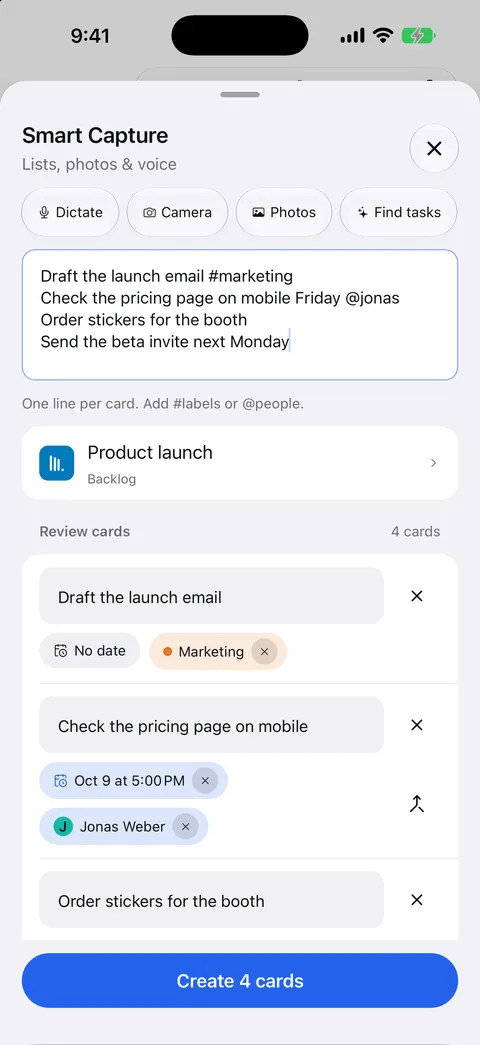
Type “tomorrow 5pm”, a #label, or an @name in the title, and Deckloud sets the due date, label, or assignee.
Smart Capture for lists.
Paste a list, or dictate or photograph one on supported devices. Smart Capture turns it into cards you review before they are created.
What is free.
Each device gets 10 free captures a month, and one Smart Capture of up to 5 cards counts as one. Pro has no limit and takes up to 20 cards per Smart Capture.
04
Everything stays ordinary Deck data
Once it syncs, a captured card is a normal Deck card on your server. Open it in the web app or any other client.
FAQ
Practical questions
Does Quick Capture use a Deckloud relay?
No. In self-hosted mode, captured cards go from your device straight to your Nextcloud server.
What happens if I capture while offline?
The card waits on the device and goes to your server when the connection returns.
Can I capture into different boards?
Yes. Pick any board and list in the capture sheet. With Pro, a capture template saves a board, list, and labels for one tap.
Can I add several cards at once?
Yes. Smart Capture turns a pasted, dictated, or photographed list into several cards and shows them for review first.
Related
Nextcloud Deck on iPhone, in a native app.
Deckloud opens your Nextcloud Deck boards on iPhone. It syncs straight to your server, keeps edits offline until they sync, and has Pro as a one-time purchase or a subscription.
OpenNextcloud Deck recurring cards, on a schedule or after they are done.
Nextcloud Deck has no built-in recurring cards. Deckloud repeats a card on a schedule or after it is done, on iPhone, iPad, Android, Mac, Windows, and Linux.
OpenYour boards stay on your Nextcloud server.
Self-hosted Deckloud connects directly to your Nextcloud. Optional Deckloud Cloud provides a managed private workspace with no account setup.
Open